BATTLE GUIDE · work

Beat Cable Spaghetti

Opponent: A desk covered in tangled charging, monitor, and computer cables.

Win condition: A cleaner desk where cables stay organized and remain easy to replace.

Cable clutter is a routing problem before it is an aesthetic problem. A monitor cable that cannot be unplugged, a power strip that lives on the floor, and a charger that keeps escaping the desk edge need different tools. Buying three versions of the same tiny clip is how the knot wins a second term.

This guide compares three distinct jobs: contain the central bundle below the desk, guide individual cords where they need to surface, and hide a floor-level power strip. The recommendations are based on published product details and intended use, not direct-use evaluation. Measure your desk, map the cable path, and keep access to power bricks before committing anything with adhesive or screws.

Compare options
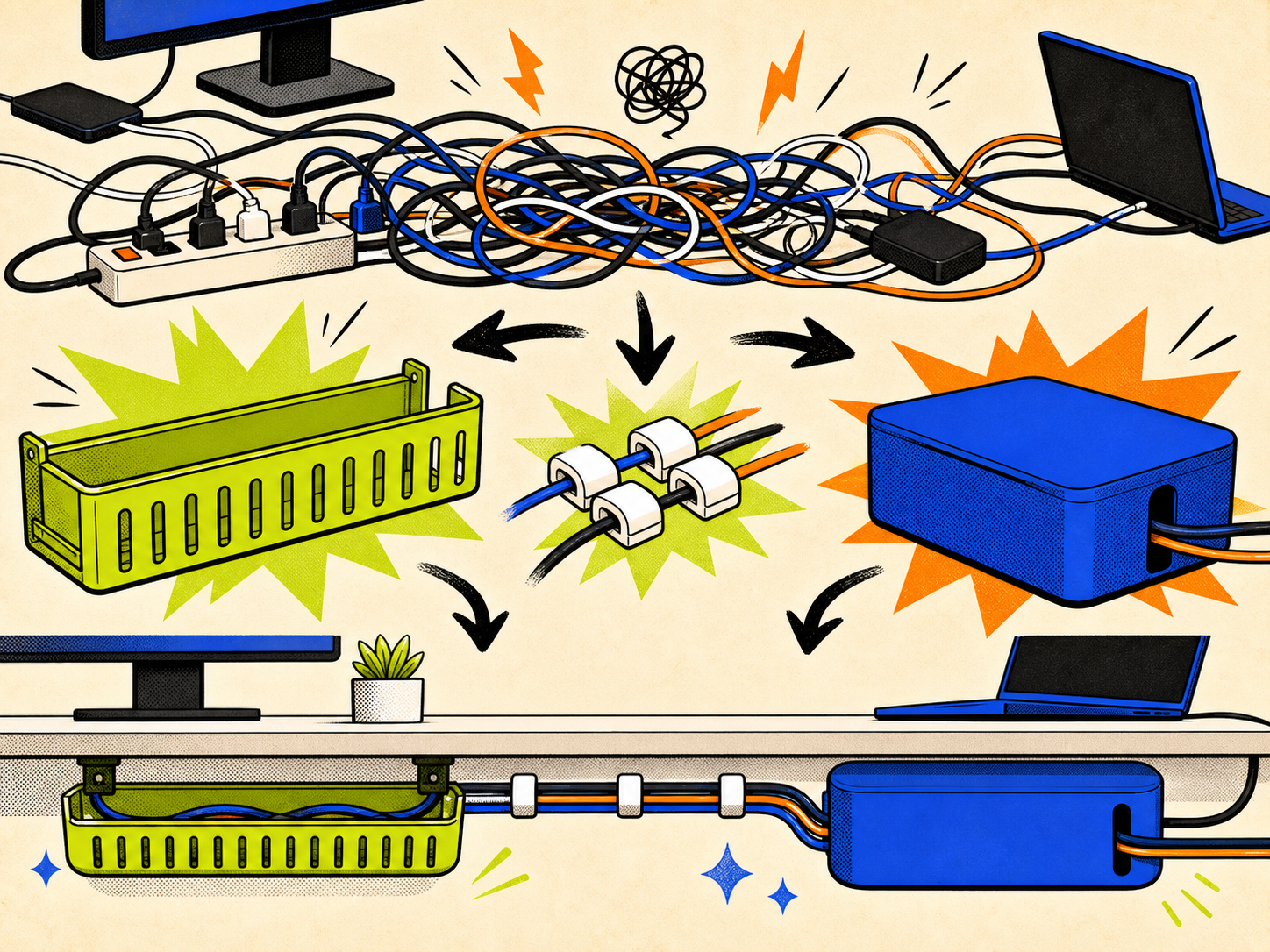
Illustration of a desk cable tangle with a tray, clips, and cable box

Three ways to make this battle smaller.

Illustrative category image of an under-desk cable tray

Illustrative product type, not product photography.

Best Overall

Under Desk Cable Management Tray

StarTech.com's steel tray is the most complete reset for a dense workstation because it gives the central bundle a defined home. Its screw-mounted design is better suited to a desk you expect to keep arranged for a while.

Best for: A fixed desk setup with a power strip, adapters, and several cables that should live below the surface.

View Official Details Why It Wins →
Illustrative category image of adhesive multi-cord clips

Illustrative product type, not product photography.

Best Value

5-Cord Clip Organizer

The Command 5-Cord Clip Organizer is a targeted route tool, not a whole-desk cleanup. It is likely the better fit when the main problem is cable ends slipping behind a desk or along a wall.

Best for: A few charging or peripheral cables that need a predictable route and a reachable end.

View Official Details Why It Wins →
Illustrative category image of a cable management box

Illustrative product type, not product photography.

Best For

CableBox

CableBox is the clear role specialist for a power-strip cluster that needs to disappear from sight. It does not route every cable, but it can make the most visible pile less visually loud.

Best for: A visible floor or desktop power strip that needs concealment without under-desk drilling.

View Official Details Why It Wins →

Different jobs. Less accidental clutter.

ProductInstallationMain jobBest locationReorganizationVerdict
Under Desk Cable Management TrayScrew mountContain a central bundleUnder deskOpen tray accessStarTech.com's steel tray is the most complete reset for a dense workstation because it gives the central bundle a defined home. Its screw-mounted design is better suited to a desk you expect to keep arranged for a while.
5-Cord Clip OrganizerAdhesive stripsGuide up to five cordsDesk edge or wallReposition with new stripsThe Command 5-Cord Clip Organizer is a targeted route tool, not a whole-desk cleanup. It is likely the better fit when the main problem is cable ends slipping behind a desk or along a wall.
CableBoxPlace and routeHide a power-strip clusterFloor or desktopLift lid and adjustCableBox is the clear role specialist for a power-strip cluster that needs to disappear from sight. It does not route every cable, but it can make the most visible pile less visually loud.
Under Desk Cable Management Tray

InstallationScrew mount

Main jobContain a central bundle

Best locationUnder desk

ReorganizationOpen tray access

VerdictStarTech.com's steel tray is the most complete reset for a dense workstation because it gives the central bundle a defined home. Its screw-mounted design is better suited to a desk you expect to keep arranged for a while.

5-Cord Clip Organizer

InstallationAdhesive strips

Main jobGuide up to five cords

Best locationDesk edge or wall

ReorganizationReposition with new strips

VerdictThe Command 5-Cord Clip Organizer is a targeted route tool, not a whole-desk cleanup. It is likely the better fit when the main problem is cable ends slipping behind a desk or along a wall.

CableBox

InstallationPlace and route

Main jobHide a power-strip cluster

Best locationFloor or desktop

ReorganizationLift lid and adjust

VerdictCableBox is the clear role specialist for a power-strip cluster that needs to disappear from sight. It does not route every cable, but it can make the most visible pile less visually loud.

What each product is actually for.

Illustrative category image of an under-desk cable tray

Illustrative product type, not product photography.

Best Overall

Under Desk Cable Management Tray

StarTech.com

StarTech.com's steel tray is the most complete reset for a dense workstation because it gives the central bundle a defined home. Its screw-mounted design is better suited to a desk you expect to keep arranged for a while.

Who this is for: A fixed desk setup with a power strip, adapters, and several cables that should live below the surface.

Verified listing facts

  • The published tray dimensions are 23.6 × 4.5 × 3 in (60 × 11.4 × 7.6 cm).
  • StarTech.com lists a steel construction with black powder-coated finish.
  • The manufacturer lists a 11 lb / 5 kg capacity and mounting screws.
  • The open design includes pass-through holes for routing cables.

Facts are drawn from the linked manufacturer or retailer sources; confirm the exact variant before purchase.

Editorial judgment

Pros
  • Addresses the largest part of a multi-device mess in one move.
  • Open access appears practical when a charger or adapter must be replaced.
  • The published load rating helps plan around a power strip and bricks.
Cons
  • Requires a compatible underside and screw installation.
  • It is more commitment than a solution for one loose charging cord.
Material
Steel, powder-coated
Published size
23.6 × 4.5 × 3 in
Published capacity
11 lb / 5 kg

What to check before buying

  • Measure the clear underside of the desk before ordering.
  • Confirm screw mounting is acceptable for the desktop material.
  • Add the weight of the power strip and adapters rather than guessing.

Sources: Source 1Source 2

BetsNow may earn a commission from qualifying purchases. This does not affect the price you pay.

Illustrative category image of adhesive multi-cord clips

Illustrative product type, not product photography.

Best Value

5-Cord Clip Organizer

Command

The Command 5-Cord Clip Organizer is a targeted route tool, not a whole-desk cleanup. It is likely the better fit when the main problem is cable ends slipping behind a desk or along a wall.

Who this is for: A few charging or peripheral cables that need a predictable route and a reachable end.

Verified listing facts

  • 3M identifies this model as Command 17306 and lists two clips with four medium strips per pack.
  • The product is designed to hold up to five cords at once.
  • 3M lists use on painted walls, metal, laminate, finished wood, tile, smooth surfaces, and glass.
  • 3M says not to use it on wallpaper, fabric, textured walls, brick, or rough surfaces.

Facts are drawn from the linked manufacturer or retailer sources; confirm the exact variant before purchase.

Editorial judgment

Pros
  • A small intervention for the cables people actually touch every day.
  • Tool-free installation may suit renters and temporary desk layouts.
  • The five-port format can keep several light cables from separating.
Cons
  • It cannot contain bulky adapters or a power strip.
  • Surface preparation and compatible surfaces matter to the adhesive result.
Model
Command 17306
Cord capacity
Up to 5 cords
Pack contents
2 clips, 4 medium strips

What to check before buying

  • Check the surface against Command's listed compatibility guidance.
  • Plan the cable path before applying the strip.
  • Leave enough slack for the device to move or unplug.

Sources: Source 1Source 2

BetsNow may earn a commission from qualifying purchases. This does not affect the price you pay.

Illustrative category image of a cable management box

Illustrative product type, not product photography.

Best For

CableBox

Bluelounge

CableBox is the clear role specialist for a power-strip cluster that needs to disappear from sight. It does not route every cable, but it can make the most visible pile less visually loud.

Who this is for: A visible floor or desktop power strip that needs concealment without under-desk drilling.

Verified listing facts

  • Bluelounge lists exterior dimensions of about 16 × 6.25 × 5.25 in.
  • The brand states that the box is made from high-density flame-retardant plastic.
  • The product page lists compatibility with a grounded UL-approved power strip up to 15 × 5.25 × 2.5 in.
  • Bluelounge states that the standard CableBox does not include a surge protector.

Facts are drawn from the linked manufacturer or retailer sources; confirm the exact variant before purchase.

Editorial judgment

Pros
  • No under-desk mounting is needed for the basic use case.
  • A defined enclosure can reduce the visual impact of excess cable length.
  • The published power-strip limit gives a concrete pre-purchase check.
Cons
  • It uses floor or desk space instead of freeing it.
  • A box is concealment, not a complete routing system.
Published size
16 × 6.25 × 5.25 in
Material
High-density flame-retardant plastic
Power strip
Not included

What to check before buying

  • Measure the power strip against Bluelounge's listed limit.
  • Leave cable exit paths that do not pinch plugs.
  • Use the product only with the electrical equipment and placement its instructions permit.

Sources: Source 1Source 2

BetsNow may earn a commission from qualifying purchases. This does not affect the price you pay.

Choose the job before the object.

  1. Map the power strip firstFind the heaviest and least flexible objects before shopping: the power strip, monitor bricks, dock, and desktop tower cables. A tray or box only works if those objects fit its published dimensions and installation plan.
  2. Keep one service loopDo not pull every cable taut. Leave enough slack to move a monitor, unplug a laptop, or replace a charger without dismantling the whole system.
  3. Match the mount to the surfaceAdhesive clips depend on compatible, prepared surfaces. A screw-mounted tray needs a desktop underside with safe clearance. Check the manufacturer instructions instead of treating all desks as interchangeable.
  4. Separate routing from concealmentA box can hide a power strip but cannot stop every cable end from falling. A clip can route a cable but cannot hold adapters. Combining roles is usually more useful than buying duplicates.

Questions from the battle line.

Should I start with a tray or clips?

Start with the biggest visible failure. If a power strip and adapters form the main knot, a tray is likely the more meaningful first change. If the desk looks fine until one charging cable falls behind it, a clip is the smaller and more targeted purchase. Check mounting compatibility before deciding.

Can a cable box hold any power strip?

No. Compare the exact strip dimensions with the box's listed interior or compatibility limits. The Bluelounge CableBox page specifies a maximum supported grounded UL-approved power strip size. Do not force plugs, extension blocks, or cables into a box that does not provide the required clearance.

Will adhesive clips work on every desk?

No. Command lists compatible smooth surfaces and separately lists surfaces it says not to use. The surface material, texture, cleaning process, and cable weight all matter. Follow the brand's installation instructions and leave enough slack so the clip is not asked to carry a cable's full pull.

How do I keep cables easy to replace?

Avoid tying every cable into one permanent bundle. Group by destination, label both ends if the setup is complex, and leave a modest service loop. An open tray or accessible box can make a later replacement less disruptive than a fully sealed bundle.